Employee IT Onboarding and Offboarding for UAE Businesses


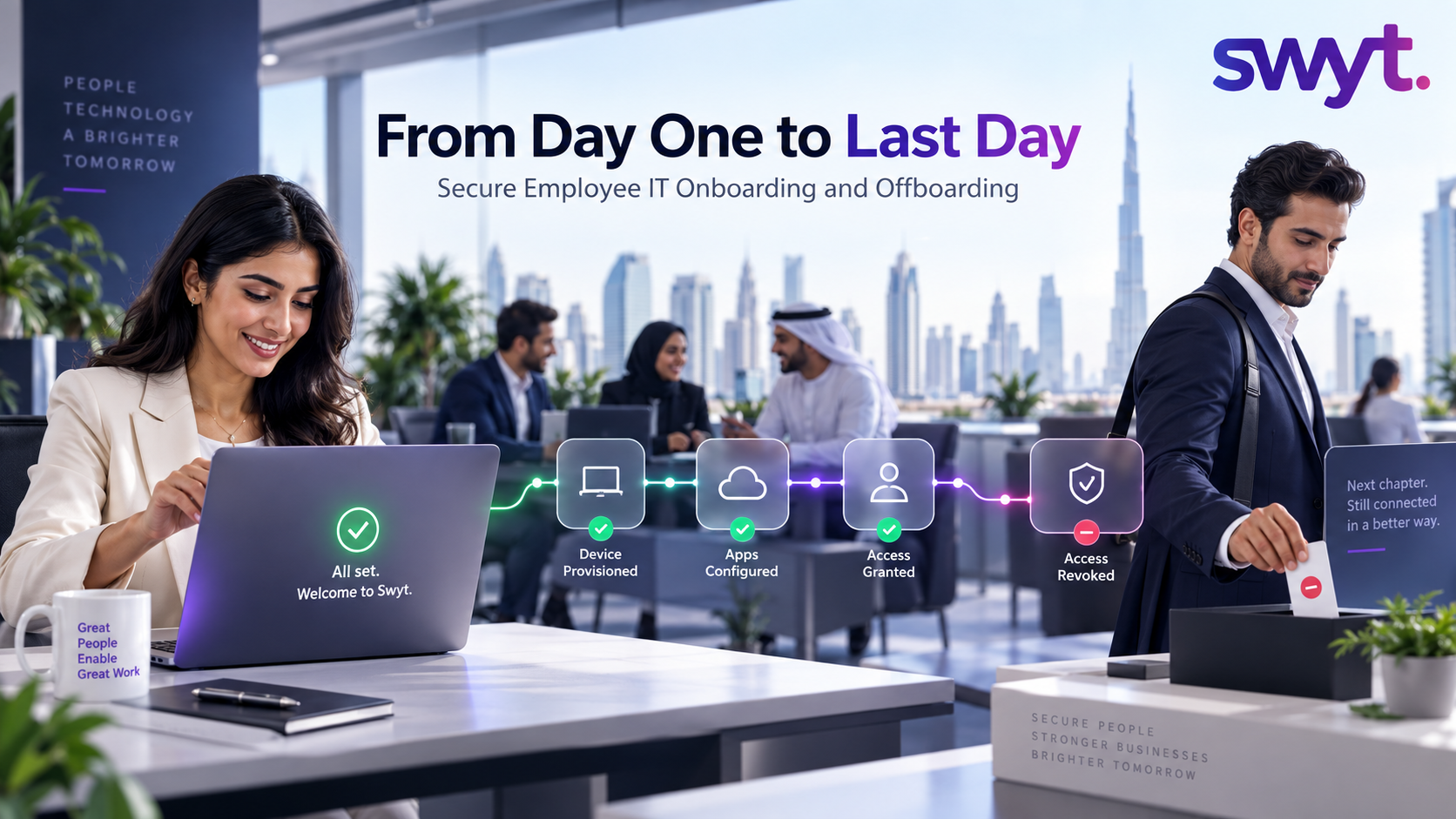
A new employee’s first morning should begin with meaningful work—not a missing laptop, an unlicensed application, or a queue of access requests.
The same discipline matters at the other end of employment. When someone leaves, every business account, device, shared folder, VPN connection and SaaS licence must be handled quickly and consistently. One forgotten login can remain active long after the employee has gone.
For a growing UAE business, employee IT is therefore not two isolated checklists. It is one controlled lifecycle. Swyt’s employee IT management service connects onboarding, access, devices, applications, support and offboarding so HR, managers and IT work from the same process.
Why employee IT breaks as a company grows
In a small team, onboarding often happens through messages: HR sends a start date, a manager lists a few applications, and someone in IT prepares a laptop. That approach can work when hiring is occasional and everyone knows each other. It becomes unreliable when the organisation adds locations, remote employees, contractors, dozens of SaaS tools, or regulated data.
The most common problems are not usually caused by a lack of effort. They are caused by fragmented ownership and information:
· HR knows the start or end date, but IT receives it too late.
· The manager knows what access is required, but there is no approved role profile.
· Devices and licences are purchased without checking available stock.
· Access is added when responsibilities expand but rarely removed when responsibilities change.
· Offboarding covers email but misses personal devices, shared accounts, browser sessions, cloud platforms or third-party SaaS.
· There is no audit record showing who approved access or when it was revoked.
A scalable process treats people, identities, applications and devices as connected records rather than separate tickets.
The Joiner Mover Leaver model
A practical way to structure employee IT is the Joiner–Mover–Leaver model. It recognises that access requirements change throughout employment, not only on the first and last day.
Microsoft describes lifecycle workflows around the same three stages: a joiner enters the scope of access, a mover changes role or boundary, and a leaver exits the scope and requires access removal. Its Microsoft Entra lifecycle workflow guidance also shows how common identity tasks can be automated across those events.
What should happen before Day 1
Fast onboarding begins before the employee starts. HR should create the employee record early enough for the manager and IT team to complete their actions against an agreed deadline.
A complete pre-boarding request should confirm:
· Legal name, job title, department, manager, location and start date
· Employment type and expected end date for contractors or temporary staff
· Approved role profile and any exceptions requiring separate authorisation
· Required laptop, mobile device, accessories and delivery location
· Email, Microsoft 365 or Google Workspace account requirements
· Business applications, shared drives, groups, distribution lists and communication channels
· MFA, SSO, VPN, device-management and security-policy enrolment
· Any regulated, financial, customer or administrative access requiring enhanced approval
Where possible, the device should be enrolled and configured before delivery. Swyt’s device management service supports policy deployment, inventory and lifecycle control, while application assignments can be managed through its application management service.
The Day 1 standard
The onboarding objective is not simply to hand over a laptop. It is to give the employee the right tools, the right access and the right security guidance at the moment work begins.
A strong Day 1 experience should include:
· A working, encrypted and policy-compliant device
· A verified company identity with MFA activated
· Only the applications and data required for the role
· Clear instructions for password management, data sharing, remote work and approved AI tools
· A short orientation showing how to contact official IT support
· Confirmation that every assigned device, licence and permission is recorded
Employees should not need to search for help through informal contacts. Swyt’s 24/7 IT helpdesk provides a defined support route across the working day and across locations.
Do not forget the mover stage
Internal transfers and promotions are frequently the weakest part of the lifecycle. A person may receive new permissions for a finance, operations or leadership role while keeping access from their previous responsibilities. Over time, those permissions accumulate.
Every role change should trigger a review of the employee’s current access against the new approved profile. The business should remove permissions that are no longer justified, not only add new ones. The same event may require a new device, security configuration, location policy, distribution list or support entitlement.
For privileged or sensitive roles, periodic access reviews provide a second control. The review should confirm that each permission still has an owner, a purpose and an active business need.
Secure offboarding starts with timing
Offboarding is time-sensitive because access should end in line with the business decision. HR, management and IT must agree the exact disablement time, especially for immediate departures, high-risk roles and employees with privileged access.
A complete offboarding workflow should coordinate the following actions:
· Disable the primary identity and revoke active sessions
· Remove access to Microsoft 365, Google Workspace, cloud platforms, VPN, CRM, finance, HR and industry-specific systems
· Reset or rotate shared credentials, API keys and administrative secrets known to the departing user
· Recover company devices and accessories, or remotely lock and wipe managed devices where appropriate
· Transfer ownership of business email, files, calendars and application records under an approved retention process
· Remove the user from groups, forwarding rules, distribution lists, third-party portals and physical access systems
· Release or reassign software licences and return devices to stock after secure preparation
· Record completion, exceptions and responsible owners for audit purposes
Technical controls such as identity management, MFA, endpoint management and monitoring should support this process. Swyt’s cybersecurity services help businesses connect access controls and operational security rather than treating offboarding as an HR-only task.
What should be automated
Automation is most valuable when it removes predictable manual hand-offs while preserving approvals. It should not grant sensitive access merely because a form was submitted.
Good candidates for automation include:
· Creating standard accounts from an approved employee record
· Assigning baseline applications and groups based on role and location
· Enrolling devices and applying security policies
· Scheduling access activation and expiry dates
· Notifying managers about pending approvals or unreturned equipment
· Disabling accounts and revoking sessions at the agreed departure time
· Opening follow-up tasks for data transfer, device recovery and licence reclamation
· Generating an evidence trail for each completed lifecycle event
Exceptions should remain visible. If a workflow fails to disable an account or cannot reach a device, the responsible team needs an alert and a tracked remediation task.
How to measure the process
A lifecycle process should be measurable without becoming bureaucratic. Useful indicators include:
· Percentage of new starters ready at the beginning of Day 1
· Average time from approved request to complete provisioning
· Number of onboarding exceptions and missing approvals
· Percentage of departures communicated before the required cutoff
· Time taken to disable access after the authorised departure time
· Devices recovered and licences reclaimed
· Failed workflow actions or unresolved offboarding tasks
· Access-review findings and permissions removed
· Employee satisfaction with setup and support
The objective is dependable execution. A business should be able to select any employee and see the devices, applications and access connected to that person, who approved them, and what changed throughout the lifecycle.
A practical implementation plan
1. Map the current process. Document how HR, managers and IT handle joiners, movers and leavers today, including informal messages and manual workarounds.
2. Create role profiles. Define the standard device, applications, groups and security requirements for common roles, departments and locations.
3. Establish one source of truth. Connect employee records with identity, device and application records so the process does not depend on duplicate spreadsheets.
4. Set approvals and timing. Identify who can approve access and how much notice IT requires for normal and urgent events.
5. Automate standard actions. Trigger repeatable provisioning, policy application, notifications, disablement and evidence capture.
6. Test exceptions. Simulate a new remote employee, an internal transfer, a contractor expiry and an immediate departure.
7. Review outcomes. Use lifecycle reports to resolve delays, reclaim licences and remove unnecessary access.
How Swyt supports the complete employee IT lifecycle
Swyt combines a managed operating process with the technical controls required to execute it. Through IT outsourcing and MSP support, businesses can coordinate employee requests, devices, applications, identities, security and support through one accountable service.
The scope can include:
· Pre-boarding coordination and Day-1 readiness
· Device preparation, enrolment, delivery, tracking and recovery
· Microsoft 365, Google Workspace and SaaS account administration
· Role-based access, MFA, SSO and policy enforcement
· 24/7 employee IT support across locations
· Secure offboarding, access revocation and device handling
· Asset and licence visibility for HR, Finance and IT
· Operational records and recurring reporting
For businesses that prefer predictable ongoing support, Swyt also offers an IT annual maintenance contract covering managed support and recurring IT operations.
Frequently asked questions
What is employee IT onboarding?
Employee IT onboarding is the process of preparing a new worker’s company identity, device, applications, access and security controls so they can work productively and safely from their first day.
What is secure employee offboarding?
Secure offboarding removes or transfers access, protects company data, recovers or wipes managed devices, preserves required business records and documents completion when an employee or contractor leaves.
When should IT be notified about a new starter?
As early as possible after the hire is confirmed. The organisation should define a standard notice period based on device availability, shipping, approvals and the complexity of the role.
Should access be copied from another employee?
Copying access may be convenient but can reproduce excessive or outdated permissions. Use an approved role profile as the baseline, then document any exceptions.
What happens when an employee changes role?
The mover event should review existing access, remove permissions that are no longer required, and add only the access justified by the new role.
How quickly should access be removed after departure?
The disablement time should match the authorised departure time set by HR and management. High-risk or immediate departures require tightly coordinated action without avoidable delay.
Can onboarding and offboarding be automated?
Yes. Standard provisioning, policy assignment, notifications, expiry and disablement can be automated, while approvals and exceptions remain controlled and visible.
Can Swyt support employees outside the UAE?
Swyt’s service is designed to support hybrid and remote teams globally through remote provisioning, managed tools and 24/7 helpdesk coverage, with onsite coordination where included in the agreed scope.
Make every employee IT step controlled
Swyt can assess your current employee IT process, define role-based workflows and manage the devices, applications, access, security and support behind every joiner, mover and leaver.
Book a free employee IT management consultation with Swyt

.png)